
Digital Asset Lifecycle: From Creation to Archiving
Why You Lose Track of Things (and Why That Happens)
As a marketing team grows, the volume of content automatically increases as well. What once started as a simple folder structure gradually turns into a jumble of storage locations, files, versions, and loose agreements. At first, this works just fine. Until you start noticing that things are going wrong more and more often.
You're looking for an image that should be somewhere.
Open several folders and click on three versions of the same file.
And in the end, you choose one, without being sure if it’s the right one.
That's not an isolated incident. It's a pattern.
That’s exactly where the digital asset lifecycle becomes interesting. Not as a theoretical model, but as a way to understand why you lose control of your digital assets as your organization grows.
What is the digital asset lifecycle?
The digital asset lifecycle describes how digital files such as images, videos, and documents move through your organization: from creation to use and ultimately to archiving. It is an essential part of effective Digital Asset Management (DAM). Without insight into this lifecycle, it becomes difficult to manage digital assets efficiently and use them consistently. On paper, that process is straightforward. In practice, phases overlap. Assets are modified without anyone knowing. Files wander between teams. And what was once the “final version” turns out to be outdated just a few weeks later.
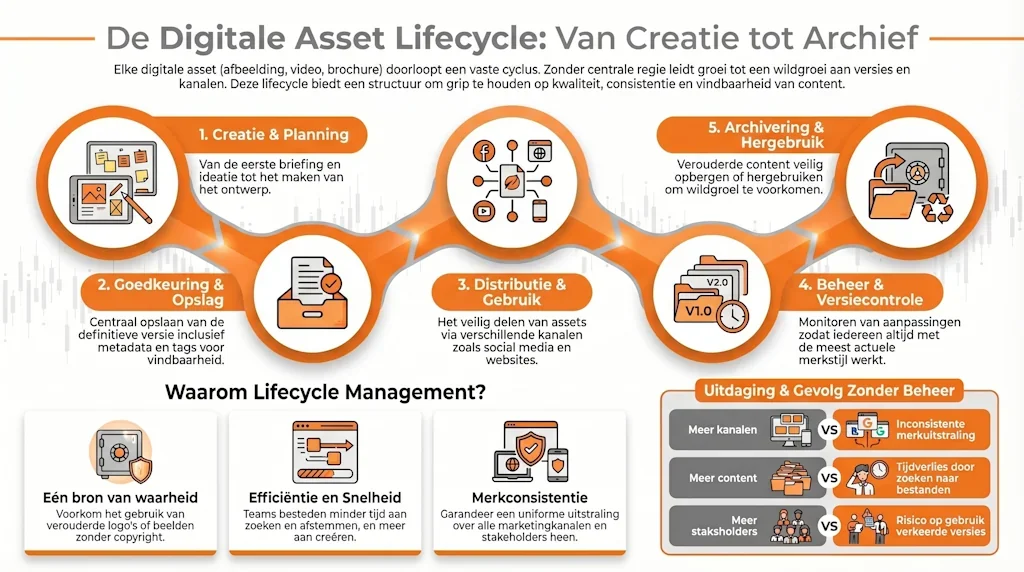
From creation to archiving: how assets actually behave
1. Creation: speed first, structure later
It all starts with creation. Campaigns need to go live, and content needs to be finalized. In this phase, the focus is on speed. That makes sense, but this is often where the first problems in your asset lifecycle arise.
Files are given unclear names, versions are stored locally, and there is no central location where it is clear which version is the correct one. This makes managing digital assets more complex than necessary right from the start.
2. Review and approval: feedback without an overview
Before an asset is used, it usually goes through a round of feedback. In practice, this often takes place via email, chat, or separate documents. Feedback gets scattered, and changes are made along the way. The result: confusion about which version is the latest and whether it has even been approved yet.
3. Storage: everything is stored somewhere
Once created, assets are stored—usually across various internal or external systems. Some are stored in a shared folder on the internal H-drive, others in a project management tool, and still others in a cloud environment or your online store’s CMS. For the team itself, this approach often still works.
Until someone outside that team needs something. Then the search begins. Or worse: recreating existing content, simply because it can’t be found.
This is a common problem for organizations that lack a clear structure for managing digital assets.
4. Distribution and Use: Where Things Go Wrong
When assets are put to use, you see the impact of everything that has happened before.
An old logo in a presentation.
The wrong image on social media.
Not the latest version of the product image in your online store
Content that no longer aligns with your brand.
Or an overload of content featuring the same image over and over again.
Not because people make mistakes, but simply because it’s unclear which assets should be used. Here you can immediately see the impact of poor digital asset management in marketing.
5. Management and version control: lack of oversight
Assets are constantly evolving. New versions are added, formats change, and content is reused. Without proper version control, confusion arises: which version is current, what can still be used and how often, and who is responsible? This makes collaboration more difficult and increases the risk of errors.
6. Archiving: the often-overlooked step
The final phase of the lifecycle often receives (too) little attention. Assets continue to exist, even when they are no longer relevant or must be retained due to legal requirements. Old campaigns continue to circulate and outdated files remain in use, but are often difficult or impossible to find. As a result, the distinction between what is current and what is not becomes blurred, increasing the likelihood that incorrect content will be reused.
Why this issue is coming up right now
The volume of content is growing exponentially. More channels, more campaigns, more variations, and faster time-to-market. At the same time, marketing teams are working with an ever-increasing number of tools, systems, and platforms. Without structure, friction arises, and many organizations recognize this: they spend more time searching, coordinating, and fixing issues than they do creating content. And that is precisely when the need arises for better Digital Asset Management.
The tipping point: when you need to change the way you work
Most organizations gradually find themselves facing this problem. At first, it’s still manageable. Then things start to get confusing. And eventually, it begins to affect speed and consistency.
This creates a need for:
a clearer overview
more structure
one central location for all digital assets
Not as a luxury, but as a prerequisite for the organization to continue growing without processes getting bogged down or unnecessarily slowed down.

The role of DAM: a logical consequence
Sound familiar? If so, the problem probably isn’t with your content, but with how assets move through your organization. Many organizations end up turning to a DAM system for this reason. Not because they need yet another tool, but because they:
want to manage their digital assets centrally
want to work with the correct versions and permissions
want to bring structure to their content processes
want to implement future-proof solutions
can be integrated with other systems.
A DAM system helps support the entire digital asset lifecycle: from creation to archiving.
Conclusion: Control starts with understanding
The digital asset lifecycle isn’t just a theoretical model. It’s the day-to-day reality for any organization that works with content. As long as you don’t have a clear understanding of how assets move through your organization, you’ll keep solving problems that keep coming back. You don’t gain control by working harder, but by bringing structure to how you manage your digital assets. And that’s exactly where the transition from chaos to control begins.
Curious to see where you stand?
Many organizations recognize the signs but don’t know where to start. In our white paper , “Are Your Digital Assets Still a Mess?”, we take a closer look at the causes and the first steps toward greater clarity and control. Or find out how to get your digital asset lifecycle under control during a no-obligation demo.
Frequently Asked Questions About the Digital Asset Lifecycle
-
A digital asset is any digital file that holds value for your organization, such as images, videos, documents, and brand identity files. These form the foundation of all your marketing content. Learn more about digital assets >
-
The Digital Asset Lifecycle describes all the stages a digital file (asset) goes through: from creation and storage to use and archiving.
-
Effective Digital Asset Management (DAM) helps organizations manage assets centrally, find them more quickly, and use them consistently. This prevents errors and saves time.
-
A DAM system becomes essential when digital assets are hard to find, multiple versions are circulating in confusing folder structures, and teams are no longer working with the same files.